When I get a call from an electrician, a telecom technician, or a field service manager panicking about a sudden cable outage, the first question I ask is not “did you check the breaker?”—it’s “what display is on your cable fault tester?” For 12 years, I’ve supplied cable fault testers to teams across residential, commercial, and industrial sectors, and I’ve learned that the display of a cable fault tester isn’t just a window for numbers—it’s the difference between a 20-minute fix and a 4-hour site search. Too many operators default to picking a tester on spec sheets, not on how its display works when they’re standing in a rain-soaked utility closet or staring at a dark fiber vault at 2 a.m. Today, I’m breaking down the real, practical display types you’ll find on the cable fault testers we supply, why each matters for actual on-the-job work, and what to ask for before you buy. Cable Fault Tester
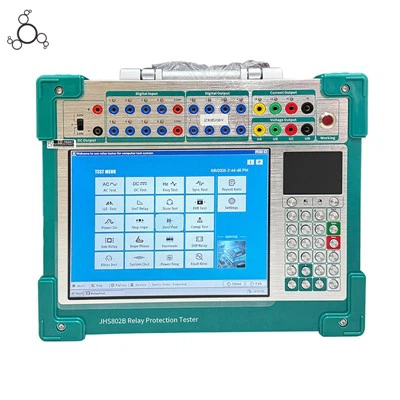
Let’s start with the basics: a cable fault tester’s core job is to send a signal down a wire, wait for it to bounce back from a fault (a break, short, or impedance mismatch), and translate that echo into actionable data. The display is the bridge between that raw signal and your ability to tell where the fault is, how bad it is, and what kind of damage you’re dealing with. For a long time, the only displays you’d see were simple analog dials or light arrays, but modern testing needs way more nuance.
First up, the single most common display type for mid-range and entry-level testers: the Graphical LCD (GLCD) monochrome display. When I first got into this business, we only offered these for our budget line of testers, and I used to cringe when a customer would call saying “the numbers are too small” or “I can’t tell if that’s a fault or noise.” But over the last decade, we’ve updated our GLCD models drastically, and they’re now workhorses for small telecom crews and residential electricians. Let’s get specific: these are 128×64 pixel or 240×160 pixel displays, usually backlit with LED, and they plot the time-domain reflectometry (TDR) trace as a simple line graph. A sharp peak means a fault; a flat line means good cable. What makes these practical is their low cost—so we can pass savings on to small teams—and their simplicity. You don’t need a degree in electrical engineering to read a line graph. But here’s the catch: they’re monochrome, so it’s easy to mix up a small, early fault signal with background noise, especially if the cable is old or has multiple small splices. I’ve seen a new tech spend an hour tracing noise because their GLCD display didn’t color-code fault signals. That’s why, for many customers, stepping up to a color graphical display is worth the extra investment.
Color graphical displays, which are standard on our mid-to-high-end cable fault testers, solve that exact problem. These are usually 320×240 or 480×272 pixel color screens, and they use color coding to separate different types of signals: red for hard faults (open breaks, shorts to ground), yellow for intermittent or high-resistance faults, green for good, uninterrupted cable, and blue for noise or unwanted reflections from splices or connectors. Last year, we worked with a national telecom provider that had a recurring outage on a 10-mile fiber run. Their old monochrome GLCD kept showing a flat line, but when they upgraded to our color graphical display, they spotted a tiny yellow blip 8 miles in—turns out it was a corroded connector that only failed when the humidity spiked. That’s the kind of win only a color display can catch, because you can distinguish a real fault from random electrical noise without squinting. Another huge benefit of color graphical displays is that they can show multiple traces at once. For example, you can compare a new cable’s trace to a reference trace of a working cable, or toggle between TDR, time-domain transmissometry (TDx, used for fiber testing), and fault location data all on one screen. The only downsides? They draw a bit more battery power, so you need to carry extra batteries for full-day jobs, and they’re more prone to glare in direct sunlight. We solve that by adding a sunlight-readable coating to all our color display models—something many competitors skip, which is why field crews swear by our units.
Now, there’s a display type that’s been growing in popularity over the last five years, and it’s the one I get the most questions about: the touchscreen graphical display. Wait, I know what you’re thinking—“touchscreens are just for phones, not for heavy-duty tools.” But hear me out. For our industrial clients, like power utilities that test 35kV underground cable, touchscreen displays are a game-changer because they let you zoom in on a small section of a trace with a tap, or pull up a history of previous tests without fumbling with physical buttons while wearing thick work gloves. Last year, a power utility tech told me that before we supplied our touchscreen testers, he’d have to take off his insulated gloves, drop his tester in the mud, and spend 10 minutes adjusting settings between every test run. With the touchscreen, he can swipe to scroll, tap to zoom, and even save a test trace directly to the device’s memory without gloves. Another plus: touchscreen displays can run custom firmware, so we can program them to show exactly the data a specific client needs. A telecom crew might want to see fault distance in feet, while a power utility wants it in meters, and we can toggle that on the fly via the touchscreen. The only caveat for touchscreens is that they’re more fragile than physical buttons, which is why we build all our touchscreen models with a scratch-resistant Gorilla Glass outer layer and a rubber protective case as standard. We lost a few customers early on when we first rolled out touchscreens without cases, so now every unit we ship comes with that case—no extra cost.
Wait, there’s one more display type I need to mention, because it’s still used in niche industries: the analog + digital display combo. For long-distance high-voltage cable testing, some teams swear by a display that has a small analog needle for real-time signal amplitude and a digital readout for fault distance. Why? Analog needles are great for showing sudden spikes or drops in signal that happen in milliseconds, which is critical when testing cable that’s 20 miles long, where a small spike can be a fault 18 miles out. The digital readout gives you an exact number, so you don’t have to guess between two marks on a graph. We supply these combo displays for power utilities that do routine testing on high-voltage transmission lines, and while they’re less common than graphical displays, they have a loyal user base for heavy-duty, long-range testing.
Now, let’s talk about what display features matter most, because spec sheets often list “color display” or “touchscreen” without telling you if it’s actually usable in the field. First, display resolution. A 128×64 GLCD is fine for testing 100-foot residential wire, but if you’re testing a 5-mile fiber run, you need at least 240×160 pixels to pick up a 1-inch fault blip on the trace. Second, backlighting. All our displays have adjustable backlight levels—we’ve seen way too many testers that are either too bright to see in the dark or too dim to read in daylight. Our backlights have 10 adjustable levels, plus an automatic setting that adjusts based on ambient light, which is a huge win for night shifts. Third, data export. This is something most people don’t think about, but a good display lets you save test traces, note fault locations, and export the data to a laptop or phone. We build Bluetooth and USB-C connectivity into all our displays, so you can send a test report straight to your office while you’re still at the site—no more typing numbers in a dark truck after a 12-hour job.
I’ve seen too many crews waste time, money, and even miss critical outages because they picked the wrong display for their cable fault tester. A residential electrician doesn’t need a touchscreen with 480p resolution—they just need a simple, bright GLCD that can tell them where a break in a 50-foot Romex wire is. A telecom technician testing 10-mile fiber needs a color graphical display with high resolution to spot tiny impedance mismatches. A power utility testing high-voltage cable needs either a touchscreen or an analog-digital combo to handle long-distance, high-signal tests.

If you’re in the market for a cable fault tester, don’t just go by what’s on the spec sheet. Think about where you’ll use it: are you working in narrow utility closets with low light, or outdoors in direct sunlight? What’s the length of the cables you test? Do you need to save test data for reports? We’ve helped hundreds of crews pick the right display for their exact needs over the years, and there’s no one-size-fits-all answer. But one thing’s consistent: the display is the most important part of your cable fault tester, because it’s what you’ll be staring at when every minute counts.
Contact Resistance Tester If you’re ready to upgrade your cable fault tester or just have questions about which display type works for your team, don’t hesitate to reach out. We supply units for every industry, with displays tailored to residential, commercial, telecom, and power use, and we’ll walk you through every feature to make sure you get exactly what you need. Whether you’re troubleshooting a single residential wire or managing a national telecom network, the right display will save you time, reduce frustration, and help you fix outages faster.
References
- Institute of Electrical and Electronics Engineers. (2020). Time-Domain Reflectometry Basics for Cable Fault Location. IEEE Power & Energy Society.
- Telecommunications Industry Association. (2021). Field Testing Standards for Copper and Fiber Cables. TIA-568-C.2.
- International Electrotechnical Commission. (2019). Cable Fault Tester Safety and Performance Requirements. IEC 61010-2-031.
Wuhan Jiuhua Jingce Power Equipment Co., Ltd.
As one of the most experienced cable fault tester manufacturers in China, we offer a wide range of products with superior quality. Please feel free to wholesale bulk durable cable fault tester from our factory. For price consultation, contact us.
Address: 601,Unit 1,Building D4-02,Optics Valley Center,303 OpticsValley Avenue,Wuhan
E-mail: market@wuhanjhjc.com
WebSite: https://www.powertransformertester.com/
